Player Data and Analytics
One of the main drivers behind the creation of Football Apptitude was the desire to provide users with a tool that would enable fast, detailed analytic features that try to account for some of the more common blind-spots encountered in other sports data interfaces. In other words, giving the user a strong dataset, available quickly, with meaningful comparisons.
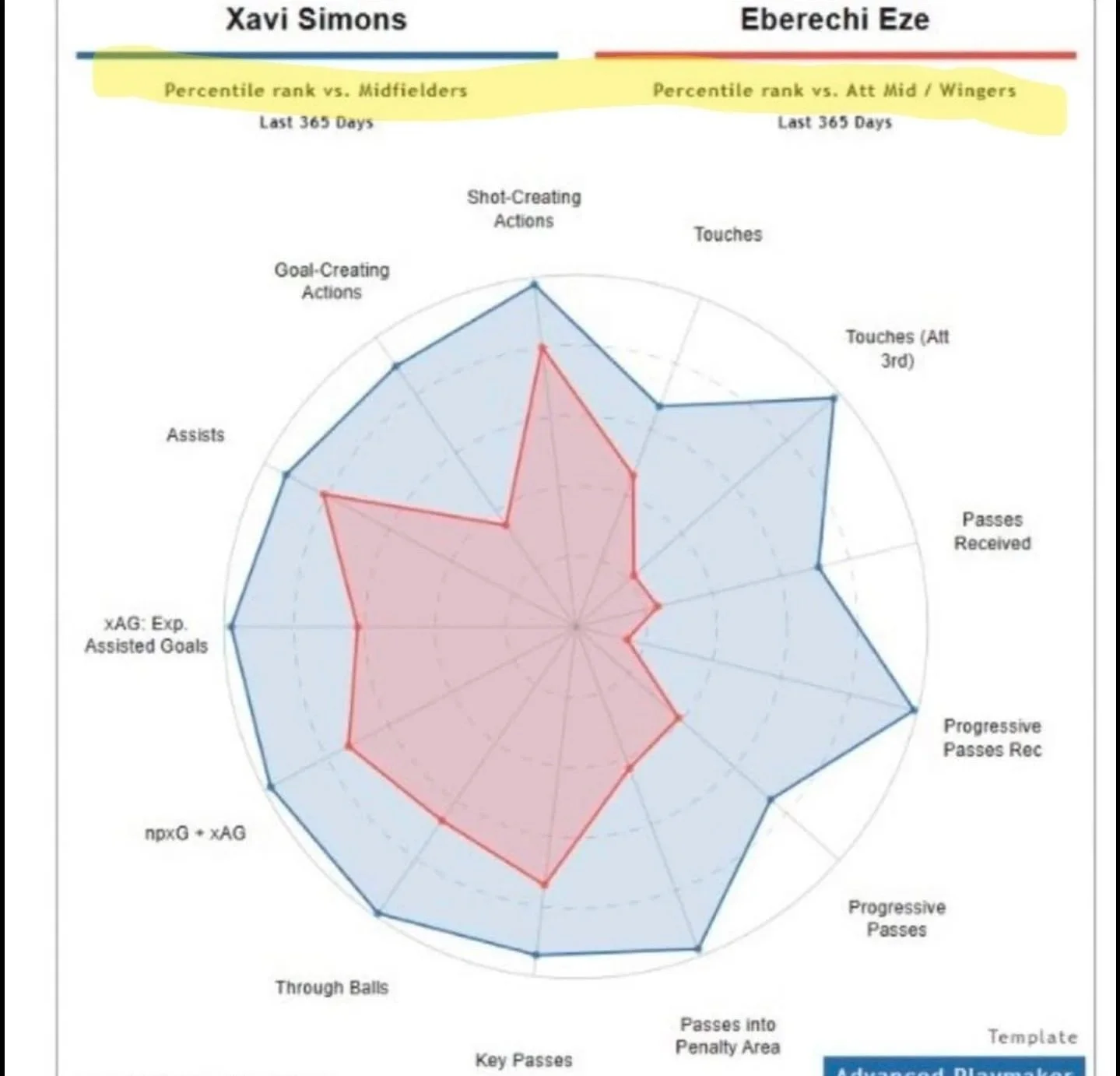
In particular, I was infuriated by the most dreadful player comparison chart I had ever seen. The chart in question was obviously a serious case of “cope” doing the rounds on Tottenham twitter after they completed the signing of Xavi Simmons (following Eberechi Eze moving to rivals Arsenal).
These kind of ‘Apples to Oranges’ charts often do the rounds during transfer windows,
and it’s often for some combination of the following reasons:
Fans being intentionally deceptive to make themselves feel better.
Its really hard to get good data for good comparisons.
Nothing can be done about the first one… but something can be done about the second one.
How Bad Data Wastes Time
In an “Apples to Oranges” comparison, it is often easy to identify what information about the chart makes the comparison unreliable. In the case of the “Cope” chart, you can immediately see:
The positions that the player data is benchmarked against are different: There is also not useful information about the benchmark (e.g.: Is Xavi being compared to all the midfielders in the world? In the Bundesliga (where he played for RB Leipzig)? In the Premier League (the league Eze plays in an Xavi was moving to?). Without this information the chart is actually meaningless for comparison purposes.
Aggregate totals over 365 days: One player may have played 20 more games than the other. You can’t tell from this chart.
The players play in different league: Xavi shows more passes received in the chart, but is that an easier stat to obtain in the Bundesliga than the Premier League?… You can’t tell from this chart.
What Football Apptitude Does Differently
Football Apptitude seeks to avoid these common pitfalls using two different solutions. Firstly, it offers an open, seamless, customisable interface that allows an extensive amount of customisation while ensuring the user understands what the data is showing them.
Secondly, it deploys the use of z-score comparisons throughout the suite, meaning users are able to perform meaningful comparisons that show how players rank in the comparison. Read more about z-scores here.
Statistic and Comparison Customisation
Football Apptitude allows you to configure any of the following comparison categories, ensuring you can get a clear picture of player performance, whether you are interested in season totals or per match /90min averages.
Player Data vs Player data offers 6 different baselines for comparison:
vs Player 1's league position avg.
vs Player 2's league position avg.
vs Own league position avg.
vs Player 1's club position avg.
vs Player 2's club position avg.
vs Own team position avg.
Player Data
Player vs Team comparisons also offers 6 baseline comparison types:
vs League positional average for the chosen player: How does Harry Kane and the forwards of Real Madrid compare to the average performance of Bundesliga forwards?
vs Comparison team’s league positional average: How does Harry Kane compare to the forwards of La Liga?
vs Comparison team’s positional averages (x4): How does Harry Kane compare to Real Madrid’s Forwards / Midfielders / Defenders / Goalkeepers?
Player vs League comparisons also offers 4 baseline comparison types:
vs Comparison league positional averages (x4): How does Ousmane Dembele compare to the Forwards / Midfielders / Defenders / Goalkeepers of the Premier League?
Team Data
Team data can be used to conduct the following comparisons:
VS_TEAM2 (default): Team 1 measured against Team 2 as baseline (Team 2 = z-score 0)
VS_TEAM1: Team 2 measured against Team 1 as baseline
VS_TEAM1_LEAGUE: Both teams scored as z-scores vs Team 1's league average
VS_TEAM2_LEAGUE: Both teams scored as z-scores vs Team 2's league average
VS_OWN_LEAGUE: Each team uses its own pre-calculated league z-scores
VS_OPPOSING: Cross-league: each team benchmarked against the other's league average
Football Apptitude also allows you to configure any of the following comparison categories for Team data whether you are interested in season totals or per-match:
Primary team: Pulled from the Team Detail screen with the team's league and season pre-loaded.
Season selector: Choose which season's data to use (auto-selects the team's own season).
Display mode toggle: Totals or Per Match (Per 90 minutes).
Stat filter: A two-level drill-down selector: choose by category (e.g., Attacking, Defensive), then pick individual stats within it.
Comparison type: Choose Team vs Team or Team vs League.
Comparison target: Pick a second team (any league, any season) or a target league.